Maintaining the 1941 Buick Roadmaster

The Buick is on top of the ramps. Chocks are behind each rear wheel. From this position I was able to access the filler plug for the transmission.

The Buick is on top of the ramps. Chocks are behind each rear wheel. From this position I was able to access the filler plug for the transmission.

All old cars have problems. Some problems are truly serious ones and others are purely cosmetic. My ’41 Buick had plenty of problems when I purchased it, but none of them prevented me from driving it 90 miles just to get home. That was a good start.

I decided to improve on the Buick and to put it to use as much as possible. I did not want a car that never saw daylight or the open road. My first priority was safety and that required a complete inventory of all issues with this 73-year-old car. I soon found out that the entire gas line was made of rubber, probably neoprene. That was not to my liking. Besides the fact that it was not original to the car, I also did not trust a soft line that was so long. My mechanic replaced the entire fuel line with steel. I found the correct clamps and grommets to assist this process and I also determined the correct path along the chassis that the line must follow.

This is the old fuel pump that was removed. I replaced it with a rebuilt one.

This is the old fuel pump that was removed. I replaced it with a rebuilt one.

Of course a good fuel line is only one part of the gasoline delivery system. If you replace the line there are still plenty of other things that can go wrong. I found this out early on when the car broke down within one block of my home. I was out for a fun and uneventful ride (the best kind) when the car sputtered to a stop. I knew I had enough gas but unfortunately it was not getting to the carburetor. A good neighbor helped me push the car to the side of the road and my wife walked home, vowing to never ride in the Buick again. I don’t recall how I got the car back to my garage, but I did. After determining the fuel pump was not pumping I sent it off for a rebuild. The new rebuilt pump has been in place for several years now without any issues.

This is the gas tank as it appeared when I removed it. I cleaned it out, painted the exterior, and added new insulation under the hanging straps before putting it back on the car.

This is the gas tank as it appeared when I removed it. I cleaned it out, painted the exterior, and added new insulation under the hanging straps before putting it back on the car.

I also added an inline fuel filter (something that Buick did not do) so as to protect the pump and hopefully prevent another failure. As an additional precaution I removed the gas tank and had a local garage clean it out.

This is the underside of the toasted fuel level sending unit. The photo is out of focus but it does display nice rust!

This is the underside of the toasted fuel level sending unit. The photo is out of focus but it does display nice rust!

They did a terrible job, leaving all sorts of stuff rattling around inside. So, I completed the task myself and finished off by painting the tank and installing a new gas gauge sending unit (the old one looked like it was dug up from a 1920 junk yard).

The gas gauge was a real trip. I tested the sending unit while the tank was still off the car. I applied power directly with a wire run from the battery. All worked well as the dash gauge responded nicely to my every up (empty) and down (full) movement of the float arm. That is it worked until I finally re-installed the gas tank and filled it. The dash gauge still remained stuck at 1/4 full. The addition of a separate ground wire to the fuel tank did not help. I do not detect any voltage on the line going to the gauge, so the next step will involve running a new wire back from the dash.

Then there are the jobs that require getting way under the car. Some time ago I purchased two nice car ramps to make this possible. They are the kind that you drive the car up so that it will be elevated some 10-12 inches. I need all of those inches to get under a car! The ones I purchased are called Rhino Ramps. They are made of a heavy-duty plastic and they can nest into each other for storage. (Amazon (see link) currently has them for $10 less than I paid.)

The problem was that I was a bit timid about driving the Buick up on the ramps. My car has a 3-speed column shift and it shifts into first with some reluctance. It’s a touch and go thing between the clutch and the throttle. The total distance to travel up the ramps is less than 3 feet. Once you get to the top the car must be stopped immediately or it will plunge over the end. This is easy to control with a watchful helper and an automatic transmission. I had the helper (my reluctant wife – reluctant to help, not to be my wife). I did not have an automatic.

I got the ramps pushed up against the front wheels before starting the car. It would be easier to get the car moving well and then just drive up but the chances of me missing the ramps was too great. I would have to engage the clutch and climb at the same time while being ready to brake immediately when my wife indicated I was at the top. It took three tries. On the third try I was perched at the peak of the ramp with my foot clamped down on the brake. I had the hand brake on too, but of course that only slows progress. It doesn’t actually stop anything. As I held the car steady my wife ran around the back and put chocks under the rear wheels. I warned her not to get behind the car! At this point I had made her far more nervous than I usually do. That’s pretty nervous!

This is a view of the transmission from the right (passenger) side of the car. The square bolt head at the top is the filler plug. Remove that, squeeze in hydraulic fluid until it leaks out. The only way I could reach this was by lifting the car.

This is a view of the transmission from the right (passenger) side of the car. The square bolt head at the top is the filler plug. Remove that, squeeze in hydraulic fluid until it leaks out. The only way I could reach this was by lifting the car.

When I was satisfied that all was stable I located the fill hole for the transmission fluid and cleaned up the area with some paper towels. My transmission fluid tends to leak easily. I suspect it is coming out the junction where the torque ball hooks on to the back of the transmission. It’s a big job to replace the seals that go there (the entire rear end has to be dropped from the springs, part of the brake line must be disconnected, etc.). If I ever determine that this is the place leaking I will have someone do it. I don’t do heavy stuff. In the meantime I will get out my bottle of hydraulic fluid and squeeze it into the transmission filler. I did this until the stuff started to come back out. Done! Hopefully I won’t have to do this again for a while. Maybe I’ll come up with a safer way to climb those ramps too?


Note: Clicking on an image will enlarge it. To return, use your <Back> key. If this article was of use to you please consider telling others about it by using the social media links. Also, if you provide your email and click on “Subscribe” (bottom of column to the right) you will be informed by email of new posts. Your email will not be shared with anyone else. Thank you!

Posted in 1941 Buick Roadmaster, Occasional Commentary | Leave a comment

A Portable AM/FM/SW/SSB That Fulfills a Need


The DX-402 easily meets all my needs for a casual shortwave travel radio. I am a casual "tune around the bands" listener, not a serious Dx'er. At the same time I will not enjoy listening for long if the radio doesn't have the basics. This one has the basics and more!

The DX-402 easily meets all my needs for a capable shortwave travel radio. I am a casual “tune around the bands” listener, not a serious Dx’er. At the same time I will not enjoy listening for long if the radio doesn’t have the basics. This one has the basics and more! I consider this a truly great deal as an entry level SSB-enabled shortwave radio. You can have fun with this one.

My need? I enjoy having a personal radio along whenever I go on vacation. Not just any radio..it has to receive AM/FM/SW and if possible SSB. A radio just makes me feel connected to the world regardless of what part I happen to be in. Radio has always been a comfort to me. Why leave it at home?

I have a couple of poor-performing radios ($15-class … I just couldn’t resist) that almost are not worth packing. They are amusing to experiment with, but not much else. I also have a Sony ICF-2010. It does a great job on every band but it does have one shortcoming; it’s not a travel radio. It is big, heavy, and it would cost too much to replace if I damaged it. So, recently I have been looking for a portable that performs well and packs with ease. I was considering several of the fine radios currently marketed by Sangean , Tecsun and Grundig. Then I was fortunate to read on The SWLing Post a notice about a closeout sale of an older Radio Shack model, the DX-402. This is reportedly an upgraded version of the Sangean ATS-505. The radio may also be called the model 20-629. In any event, at a price of under $30 I could not resist.

The "World Band Radio" on the right is a real joy to play with you never know what is going to happen when you hit a button. It's a 'mystery' radio. The jwin on the left is an analog radio with a digital display. It's not all that bad but you need lots of patience to tune in a station (strong signals only). It also pays to hold it at all times to take care of the capacitance effect of your body. I love to experiment!

The “World Band Radio” on the right is a real joy to play with. You never know what is going to happen when you hit a button. It’s a ‘mystery’ radio. The jwin on the left is an analog radio with a digital display. It’s not all that bad but you need lots of patience to tune in a station (strong signals only). It also pays to hold it at all times to take advantage of the capacitance effect of your body. I love to experiment! Don’t buy these if you actually enjoy listening to radio.

I purchased what was described as a ‘used’ radio that was supposed to be in ‘very good’ condition. I received a radio that looked absolutely new. It also performs as new. This unit was probably an overstock. There is no evidence that anyone ever used it.

How does it perform? Well first be advised that I already own a GE SuperRadio II and a Sony ICF-2010 (mentioned above) so I have some decent standards to compare with. The DX-402 performs well on all bands, but not as well as the two radios that I compared it with. A quick summary:

AM Broadcast – It is less sensitive than the GE but it still pulls in the stations. The signals come in noticeably weaker and with more background noise on the Radio Shack. If you live in the city all the stations will come in loud and clear. If you are in the country (my case …. 35 miles from most AM broadcasters) the reception of distant and/or low power stations will be weaker. I live in Rhode Island. All the major RI stations come in well but with background noise. Many much stronger stations from New York come in as well or better. The fidelity is good but it is lacking in bass response. This is best noticed when the Radio Shack is compared to the larger GE which has a 5″ speaker. Also, you must orient the radio properly for good reception (it has an internal ferrite bar antenna) and keep it at least 2 feet away from a LCD monitor or you will get a buzz (no beer required).

FM Broadcast – The radio brings them in. Remember, I am at least 35 miles from any metro area. A quick tune across the band (daytime) yielded 24 stations that came in just fine. Of those stations 10 of them were extremely strong signals. At least one  , WCIB in Falmouth, MA, was 57 miles away. Others were likely more distant. The sound is good but of course it does not have the fidelity of a big radio. I connected the earphone jack on the DX-402 to my external iPad amplified speaker from Brookstone  (another great bargain) and the fidelity improved quite a bit. Speaker size counts.

Long Wave – I have not copied anything here. It is not especially sensitive. The Sony usually can copy several local airport beacons but I did not hear them on the Radio Shack.

Shortwave AM Broadcast – The DX-402 is less sensitive than the Sony. Some stations that were weak but 100% copy on the Sony were not copied at all on the Radio Shack. Otherwise, all stations that had moderate to strong signals were easy to listen to. The radio did not display any drifting and the signals were right on the correct frequency. This is exactly what I was looking for.

Shortwave Single Side Band (SSB) – I was able to copy many moderate to strong signal ham transmissions. Most hams transmit on frequencies such as 14.200 or 14.250, not at odd multiples such as 14.207 or 14.375. Usually if I was right on frequency it was not necessary to adjust the SSB clarify dial. If I did have to adjust it the signal cleared up nicely with little effort. The SSB signals were generally a bit wobbly  in tone. They were not of the same quality as on the Sony, but I was able to copy easily so long as they were relatively strong.

The ergonomics of the radio are a major strong point. The controls are easy to use and logical. All of the little things have been included. There are two different clocks (I keep one at local time and one at UTC) and they can easily be accessed by a push of the ‘Display’ button. A second press of the ‘Clock 1/2’ button toggles between the two. Memories are more than adequate and easy to save. One real neat feature is the memory list in the main display. Right below the frequency display you will see a series of numbers. If you saved all 9 of the available 9 memories per band (18 for shortwave in two pages) you will see the numbers 1-9. The memory you are tuned to will have brackets around it. How convenient is that?  Below the display is a handy list of all shortwave bands and their ranges. Bands are selected by pressing a ‘Band’ button. Then there is ‘Scan’. There is a normal scan (‘scan tuning’) that finds active stations in the current band. Then there is ‘Auto Preset Scanning’ which works on FM, AM (MW), and LW. This scan will find all of the strong stations on the band and save up to 9 of them directly into memory. I tried it on FM and it worked great!

There are plenty of other features (3-position tone switch, external antenna jack, DC-in jack, stand, alarm clock, etc.). If you want details I suggest you check out an online PDF of the radio manual. One hint: watch the display when you turn the radio off. It will briefly inform you of the battery condition by showing from 1-9 numbers (9 would indicate strong batteries). I don’t believe this appears in the manual. I learned about it by reading an informative review on Amazon.com. Now if only there was a carry strap… but then I found the well for the stand to be a good secure place to grip the radio. That will do!

The Radio Shack PLL FM Stereo/AM/LW Synthesized Receiver is not the ideal Dx radio, but it is exactly what I was looking for in a travel and lunchtime radio (I usually have a radio at hand during lunch and while sitting on the deck in the back yard … It’s summer and the living is easy…). Do yourself a favor and check out the excellent blog authored by Thomas Witherspoon, The SWLing Post. He will let you know where to get bargains like this radio and many others.

Note: Clicking on an image will enlarge it. To return, use your <Back> key. If this article was of use to you please consider telling others about it by using the social media links. Also, if you provide your email and click on “Subscribe” (bottom of column to the right) you will be informed by email of new posts. Your email will not be shared with anyone else. Thank you!


Posted in Radio: Amateur & Broadcast | Tagged , , , , , , , , , , , | 1 Comment

Which has priority: Ham Radio or Fire Pit Construction? (or OCFD, Obsessive Compulsive Firepit Disorder)

Ever since the year I gave my wife a Kodak electronic picture frame for Christmas I always make sure to ask her what she wants. That includes birthdays. This year was no different. My wife turned ____ in July (I’ve also learned not to divulge certain information without first obtaining written consent). She promptly gave me her birthday list: one fire pit, fully assembled.

Well, purchasing the fire pit was easy. Getting it home was sweaty. Building it was the problem. You see, I’ve had this 80 meter DX (OCFD) Windom antenna sitting in a bag for about 4 years. This year I finally decided to put it up. It just so happens that the antenna project was still in-process at the same time that Camille expected me to build the fire pit. I started the antenna project 4 years ago by purchasing the unused antenna for less than half price from another ham.

This is the antenna launcher. The item hanging on the right is the dart with a streamer made from an old shirt. My launcher leaks because I did not properly coat and/or twist one junction.  It still launches to about 100 feet. I need to get better a PVC joints.

This is the antenna launcher. The item in my left hand is the dart with a streamer made from an old shirt. My launcher leaks because I did not properly coat and/or twist one junction. It still launches to about 100 feet. I need to improve my technique for making PVC joints. (in the background is Gap Titan DX vertical)

Then last Christmas Mrs. Christmas brought me an antenna gun, The Joplin ARC Antenna Launcher (I like ‘antenna gun’ better). I finally had something that might be able to get a wire antenna higher than 20 feet off the ground. I built the launcher kit sometime in the spring. I then purchased a small air compressor. This would be used to fill the launcher air tank. I also use it for blowing up tires (like the one on the wheelbarrow that I needed to carry the stones used to make the fire pit) and for cleaning car parts (like the carburetor I am working on).

Well, I got the long leg (about 96 feet) of the OCFD (Off Center Fed Dipole) up in a tree at about 35-40 feet. The center insulator and balun was shot up to a smaller tree and was only about 20 feet up.

This tree supports the long (102') end of the antenna. Insert shows the antenna wire not visible in the large photo. A window sash weight holds down this end. It is probably over 40 feet up.

This tree supports the long (102′) end of the antenna. Insert shows the antenna wire not visible in the large photo. A window sash weight holds down this end. It is probably over 40 feet up.

The short end (30 feet) of the antenna went down at about 45 degrees just like an inverted V and ended up only ten feet off the ground at its terminus. This created an antenna that sagged down to about 20 feet near its middle. I tested the antenna and the only place it came close to loading with low SWR was on 40 meters.

The second try worked a little better. I took down the center insulator and then put it back up on the tree that used to hold the 34 foot segment. This time I got it to the 35-40 foot level. I tested this configuration and found that the antenna had an SWR below 3:1 on 4 bands. Not bad!

The short (34') end goes off to the left and behind the Gap vertical. The feed line is easily seen here. It comes straight down for at least 20 feet.

The short (34′) end goes off to the left and behind the Gap vertical. The feed line is easily seen here. It comes straight down for at least 20 feet.

Look closely and you can see the feed point. The short end goes to the left. The long end of the wire antenna is not visible although the rope supporting the balun/center insulator can be seen pointing to the right.

Look closely and you can see the feed point. The short end goes to the left. The long end of the wire antenna is not visible although the rope supporting the balun/center insulator can be seen pointing to the right.


Now all I needed to do was to raise the final leg to the top of a pine tree that was at a 40 degree turn from the feed-point. This was not ideal but it was better than chancing the only remaining trees that were in line with the antenna but deep in the woods. I like to reduce the chances of limbs falling on or touching the antenna, insulated or not.

Unfortunately I was also deep into erecting the fire pit at this time. The area was cleared and I had a basic ring put together. The problem was that nothing was level. I had to get the first tier level before adding two and three. Handling heavy paving bricks is exhausting work in 89 degree heat. It’s not as much fun as launching a PVC dart and fishing line 100 feet into the air. What to do? Which project comes first?

This morning my wife left home early to head for her class at the gym. That meant that I was alone for about 2 hours. Maybe I could work on the antenna, finish that, and then arrange it so that just as she returned she would see me on my knees around the fire pit. It almost worked.

My wife was happy with the fire pit. It is right under the Windom. Maybe a little smoke will enhance the signal?

My wife was happy with the fire pit. It is right under the Windom. Maybe a little smoke will enhance the signal?

I completed the antenna install and then went inside for some iced tea. That’s when Camille came home. Well, I promised to get that pit done so out I went. It took a couple more hours to get everything level and tight. We now have a fire pit right below a 80 meter Windom antenna. I wonder if the smoke will affect the insulation on the antenna wire?

  • A few notes on the antenna:
    It was made by RadioWavz.
    The construction is quite sturdy and I don’t expect it to come down soon.
    I added protective coax sealing tape to all seams on the balun (I’ve had baluns fail before when they were infiltrated by rain).
    The long end of the antenna is tied to a single window weight so that when the trees sway there will be plenty of give. I don’t want to break this antenna wire.
    The SWR is approximately as follows:
    17 meters, 1:2.4 or less entire band
    10 meters, 1:2.8 or less entire band
    20 meters, 1:3.2 or less most of the band
    40 meters, 1:2.0 or less, entire band
    80 meters, 1:1.0 to 1:2.4 for almost entire band
    6 meters, 1:3.0 for most of the band
    The remaining bands do not tune.

Last night I had a pleasant and long QSO with Mike, W1BNC, on 80 meters. I was running barefoot and he had armchair copy for the entire time. It wasn’t a long distance (80 miles from Hope Valley, RI to Southborough, MA) but it sure was a quality QSO on a noisy band. This antenna made it easy.

Resources:

Article, Whoa! Holy Cow!, by W0HC: discussion of OCF Dipole

Article, History: From Windom Antenna to Multiband OFCD; fantastic resource which has and extensive bibliography.

Note: Clicking on an image will enlarge it. To return, use your <Back> key. If this article was of use to you please consider telling others about it by using the social media links. Also, if you provide your email and click on “Subscribe” (bottom of column to the right) you will be informed by email of new posts. Your email will not be shared with anyone else. Thank you!


Posted in Radio: Amateur & Broadcast | Tagged , , , , , , , , , , , , , , | Leave a comment

There’s a Grocery Store in my Garage

This is what grocery and hardware store shelving looked like when I was a kid back in the '50's (except the Mickey Mouse telephone).

This is what grocery and hardware store shelving looked like when I was a kid back in the ’50’s (except for the Mickey Mouse telephone).

How much room does anyone have to store groceries, dishes, pans, etc. in the kitchen? For us it always seems that everything is squished into lots of small cupboards. You have to be real careful when you reach for the barbecue tongs because the rolling pin might fall on your hand. Even worse, that bottle of vodka might just keel over and smash on the tile floor.

We are fortunate that the door off the kitchen leads to the garage and in the garage we have a stand-alone closet that holds lots of stuff.

Notice the corner with all the folding chairs? That is where I put the grocery store. The chairs are now under the utility cabinets (not shown). I made space for them by tossing out empty boxes, among other things.

Notice the corner with all the folding chairs? That is where I put the grocery store. The chairs are now under the utility cabinets (not shown). I made space for them by tossing out empty boxes, among other things.

That is where excess canned goods, paper supplies, and cleaning notions go. It is a bit crowded in there, though. My recent rebuild of the garage interior inspired me to make a special place for all those canned peas and rolls of waxed paper. I decided to use the little corner next to the small stairway that connects the garage and kitchen.

Luckily I had just the right stuff to add a little flair to the project. Several months ago (closer to 12 than 3) my good friend Arthur (K1GTI) gave me a bunch of plywood and planks that were taking up room in his basement. They were once part of a small independent hardware store run by two brothers. The wood was at one time part of the aisle shelving from Armen’s Hardware and Art knew one of the owners, Sam Farmanian, who was also a ham radio operator (NM1Y, SK). We are not talking about a store from some ten years ago. This was the kind of store that I went to as a kid over 60 years ago. Shelves were made of wood. Each shelf was framed by a molding designed to accept price labels. Counter tops were made of plywood that was encased in metal edging. This was the perfect medium for a vintage-looking grocery store. Of course all functional stores have a cash register. I just happened to have a 1920’s Remington register that needed a place to rest other than the floor of the garage. A strong shelf was in order. Unfortunately I had no plans.

I anchored the shelving to studs in the wall. The plywood panel is being measured against the shelf supports so I can put matching ones on it for the opposite side. Notice the tools. This is only one third of the implements I eventually used. What a mess!

I anchored the shelving to studs in the wall. The plywood panel is being measured against the shelf supports so I can put matching ones on it for the opposite side. Notice the tools. This is only one third of the implements I eventually used. What a mess!

I looked through an old Sunset DIY book and saw some simple shelves that inspired me. I drew up some rough plans and built mine around the foundation and sill plate of the garage. Every piece came from that ancient timber that I got from Arthur. Now we can store more groceries and it’s easier to access them. As an additional bonus the grandchildren have a new store to play with. Thanks, Art!

This old label informs us that the store name was Armens. The molding is designed to hold price cards. What was it that cost nearly thirty dollars? A staple gun?

This old label informs us that the store name was Armens. The molding is designed to hold price cards. What was it that cost nearly thirty dollars? A staple gun?

My grandsons will have fun talking on Mickey and ringing up sales on the old Remington register.

My grandsons will have fun talking on Mickey and ringing up sales on the old Remington register. I may add some molding to the panel on the right.

Posted in Occasional Commentary, Radio: Amateur & Broadcast | Tagged , , , , , , , , , , , , , , , | 1 Comment

Garages are Important Too

Our first home was an apartment. My wife and I both had Camaros (she a 1974 and me a 1971). The cars made their home in the parking lot since there was no garage available. After one year of apartment life (during which time we lived on one pay check and banked the other) we purchased a new one-car garage with an attached home.


CamWithHeaderIt was a nice garage. All of the walls were finished in rough grain plaster and it had a swirl ceiling. The Camaros now spent their days in the driveway. I forgot to mention that I had a 1947 Mercury woodie in storage in a rented garage. The woodie went in the new garage (if we had a pre-nup it would have read “Vintage cars get first dibs at the garage”). The photo to the left shows my wife holding the header for the wagon. It also shows some of the garage interior.

Eventually the woodie was sold and for a short time my wife’s car went in the garage. At least until I bought the ’41 Buick. The 2000 VW Jetta (Camille’s then current ride) was Jetta1introduced to the driveway and the Roadmaster took its place in the cozy garage. My wife never complained but I knew that her short stay in the garage (to be clear, her car was in the garage, not her) made her look forward to the day when her car would have a home all its own.

A few years ago we purchased a two-car garage with attached house. Now Camille’s 2007 Honda Civic (sunroof, GPS, the whole works) had a permanent roof over its head. My Honda Ridgeline took up the driveway space. The Buick occupied the second stall in the garage (but then you knew that). Only one problem. This was an ‘unfinished’ garage. You know the type. Walls made of naked 2×4 studs, no insulation, and of course no ceiling. Where was I going to hang all the vintage license plates?

helper

My able assistant (actually she is the one who knows how to paint).

wallboard

Don’t look close; plenty of rough seams here. It’s a garage.

So, I started the garage improvement project one year ago. It is presently in the final stages. The walls are insulated and covered with plaster board. All seams are taped. The painting has begun and will be completed this week. I went for a two-tone look. Yellow above to match Camille’s new 2013 Beetle and green below to complement the Buick. I thought this was a rather unique and bold color scheme. That was until I took a ride down Main Street (Route 3) in Hope Valley this week. It seems that it was a really hard winter we just came out of and as a result the fire department was compelled to repaint all of the hydrants. I think they got the colors reversed. They should have spent more time in my garage.

OneSideDone

The yellow matches Camille’s VW Beetle and the green goes with the ’41 Buick.

The newly-painted fire hydrants in the villages of Hope Valley and Wyoming, RI.

The newly painted fire hydrants in the villages of Hope Valley and Wyoming, RI.


Posted in Occasional Commentary | Leave a comment

Repairing the Sony ICF-2010

I have several portable shortwave receivers, modern and antique. My favorite modern shortwave is the Sony ICF-2010. I purchased it back in 1989. It was a bit expensive (about $350 as I remember) but I had just received a stipend for participating in an education research project at Brown University and so I had a little extra money. Most of it went to my wife. The balance went for the Sony.

The 2010 tunes the entire HF shortwave spectrum, broadcast AM and FM, and airband. The tuning is digital, it has 32 station memory slots and it has synchronous detection. It was quite advanced for its time and still is considered one of the best portables ever made. That’s how I felt until one day several months ago when I pulled it out of the nightstand and turned it on for some bedtime shortwave listening (SWL). The audio was badly distorted. Click on the video below to hear for yourself.

Switching from batteries to plug-in transformer made no difference. It sounded similar to what happens to my vintage radios when the power supply electrolytic filter capacitors go bad. It’s an easy fix in the old radios because the capacitors are a cinch to spot (and the circuit diagrams are helpful too). But in a modern radio that uses surface mount technology and numerous circuit boards arranged in layers and attached by ribbon cable it can be a nightmare.

First I had to confirm that I was on the right track in suspecting the power supply. I immediately joined the 2010 user group on Yahoo and posted my problem. Fortunately I got a response from Rod, KB8DNS. He not only confirmed that it sounded like a capacitor but he also told me which one (C161) and its value (330mfd @10 volts). Just to be sure I posted a video of my broken radio on You Tube and asked Rod to give a listen. He responded “Yes, that is what it is, the audio capacitor C161, not too far from the volume slide”. An audio capacitor? OK, now how do I get to it? Well, Rod had previously posted a video of him opening a Sony ICF-2010 and replacing C161. I watched the video to get a few hints on how to do the deed. Next I needed the replacement capacitor. There were none in my stock because I usually repair just old radios (low capacitance, high voltage) and this was a modern one (high capacitance, low voltage). Fortunately I had in my junk box (everyone needs a junk box or two) an old circuit board that I pulled from a defunct UPS. I removed two capacitors, both of them 330 mfd @25 volts. They would be fine. I straightened the leads and began taking apart the Sony.

I took the radio apart a bit differently from the way Rod did. He ended up approaching the top of the main board from the front of the radio after removing the front shell of the case. I removed only the back shell of the case which immediately exposed the main board. I then untethered the board and partially flipped it. I took photographs and made drawings as I went so I would not forget anything. All screws that were removed were pushed through punched holes in a manila file folder and properly labeled. The steps were as follows:

Remove 4 screws in corners of case backside
Remove 1 screw in battery compartment and two under antenna
The main circuit board is now exposed. Remove the three screws holding it.
Loosen tape holding blue wire running along battery compartment
Uncoil nest of ribbon cable from cavity near tuning dial (careful!)
Push back plastic spring clamps around periphery of main board while prying up on board
Stand radio on its top edge while pulling out main board with solder pads facing you
Desolder and remove C161 (I recommend a clean solder sucker) and ream PCB through holes with a piece of wire heated by soldering iron
Insert leads for new capacitor (observe proper polarity), holding it tight against board with a rubber band
Solder in the new capacitor 
Close everything up in reverse order

The following photographs may  be helpful. Click on them to enlarge and read notations:

This is the rear cover after removing 6 screws holding it in place

This is the rear cover after removing 6 screws holding it in place

Upon removing the rear cover the main board is exposed. Click to enlarge & read captions

Upon removing the rear cover the main board is exposed. Click to enlarge


Top view of board pulled away. C161 clearly labeled & appears undamaged

Top view of board pulled away. C161 clearly labeled & appears undamaged

Original capacitor above & replacement below

Original capacitor above & replacement below


Of course I could not wait for reassembly to test the radio. As soon as the new cap was in I connected up power to the external DC-in port and turned it on. Nothing. I tried several times, moving the on/off switches around, adjusting the control board fit, etc. It was now a dead radio. I decided to close it up and try batteries. I put in three new D-cells and again there was no life. I was ready to list the radio on eBay as a “dead radio,killed by owner“. Then I noticed that I had not installed the two AA computer batteries. Were they necessary to make this thing run? I couldn’t even remember.


They were just to retain the memory, right? I was grasping at straws so I installed the computer batteries and immediately noticed that the clock came alive. Upon activating the Power and On switches the radio came alive! Every band sounded great. Watch and listen to the above video to see how well it works. The Sony was back!

(Note: It is easy to permanently damage the radio while attempting this or any other repair. Proceed at your own risk. Also, please note that I am just a hobbyist and do not repair radios other than my own.)

Resources:
Sony ICF-2010/2001D user group. This is a very active and helpful group. They even have a file library with the User Manual and a Service Manual that you can download.

Review of the ICF-2010 by Jonathan Marks.

Review of the ICF-2010 by Jay Allen

Steve Whitt Archive CD as recommended by Jay Allen


If this blog was useful or interesting, please use the social media buttons below to let others know about it. I also encourage you to use the comment area. Thanks!


Posted in Occasional Commentary, Radio: Amateur & Broadcast | Tagged , , , , , , , , , , , | 13 Comments

Icom IC-706MkIIG Operation Guide

Some years ago  I purchased an Icom IC-706-MkIIG transceiver.This was the third and final version of this very popular amateur radio. I was attracted to the 706 for a number of reasons, some of which are:

Small size makes it an ideal mobile radio
Transmits on all amateur HF bands plus 6-meters, 2-meters (VHF) and 440 (UHF)
Receives 30 kHz-199.999 MHz and 400-470.000 MHz depending on version
Works in all modes
Has digital signal processing for noise reduction (DSP)
Removable and remotable faceplate / control head
One button remote tuner control
Good meter selections including SWR, Power, ALC, and Bandscope

That’s an impressive list of features and the radio really delivers. I used it for many years in a mobile environment without any problems except those pesky menus. It seems that the only way Icom was able to pack so many features into such a small radio was to make many of the settings and choices accessible through a series of complex menus. There just isn’t enough space for lots of dials and knobs. That’s OK if you have a great memory (I do not) and if you are not running the rig mobile. It is next to impossible to make on the fly changes while driving in a safe manner. The vehicle must be stopped or you risk serious injury to others and yourself when that inevitable crash occurs (it’s a crash, not an accident).

This advertisement from May 1999 QST shows the lineage of the IC-706MkIIG. I've read that is the all time best selling transceiver.

This advertisement from May 1999 QST shows the lineage of the IC-706MkIIG. I’ve read that the 706 is the all time best-selling transceiver.

Then about 4 years ago the Icom quit working. It would receive for only a few minutes at a time and whenever I tried to transmit it would shut off within seconds and refuse to be revived for hours. I inspected all connections including the power cables going to the battery. I could find nothing wrong. The radio went into the closet until such time as I decided to fix it. That time finally came a few weeks ago. I am at a time in life where I am trying to catch up on many of the things I have let slide. Radio repair was one of them. I had sent a radio to Icom America in Bellevue, Washington in the past. It took two tries for them to fix my new IC-737 but they did do it. It was not their fault. The first time they could not replicate the problem.  The second time I told them to run it until it fails or keep it. That worked. I have had that radio working without a hitch for about 20 years now. Why not try them again?

I checked the Icom web site and found that they now have independent repair shops, located throughout the country, that also are certified on their radios. Which to pick, Kirkland (I already trusted them) or an unknown “Icom Service Center” in St. Joseph, Michigan? I called Kirkland. I asked if the Michigan shop was certified to repair the 706. The pleasant lady informed me that the St. Joseph shop was an expert at Icom 706’s and they charged $52/hr rather than the $84/hr charged by the home base in Kirkland. I sent it to St. Joseph, MI and authorized up to $200 in repairs. If it was over $200 they would call me first. I got the call after it was all done. The total was $125 including shipping. That was a good call! The official name for the service center is SAR Technical Services, Inc. How long did it take? A little over a week. What was wrong? a shield on the main board had come loose from its solder joints and was jumping around and shorting things. Now it is in solid. I will never again hesitate to send an Icom rig out for service.

Check the above You Tube video to see how well the rig works. You will note some video hash in several instances. Maybe the low battery on my camera did that? Anyways, I am quite pleased with the repair done by the Michigan Icom Repair facility. 

Now I have the 706 sitting on my home desk and I have been getting familiar with it again. It seems that I need the manual at hand at all times. Solution? I decided to write my own cheat sheet or reference card for the Icom IC-706MkIIG. So far I have made three tables in Microsoft Word. Each table summarizes the functions of one of the three main menus. With a little more work I will finish this. My goal is to have no more than 4 pages total. That should be an improvement on the non-indexed 68-page factory manual. I am tired of flipping pages and making my own index on sticky notes.

I reproduced the menu tables below. They don’t appear exactly as on the Word document due to formatting constraints of the web. Feel free to use this document if you think it might be helpful. You can download a properly formatted  PDF copy of the reference sheet by clicking on the following link:

Icom-706MKIIG Operating Guide Download 

Now back to playing with this sweet-sounding radio!

032314_1732_IcomIC706Mk1.jpg 

MENUS

Quick Press
DISPLAY
to toggle through 3 Menus, M,S,G:

M1-M4                                     Manual p.3-4

M1 SPL – Split frequency
Long Press for split; defaults to VFO B freq on TX (up 5)
A/B – Switch between VFO A and VFO B A=B (XFC when split on)Set both VFO’s to same freq.
M2 MW – Memory Write
While in VFO mode use (17) dial to choose mem. Channel. Set freq.,tone,split,etc. & push MW 2 sec to record.
M>V – Freq. Transfer
While in VFO mode hold M>V to move selected memory to VFO Becomes MCL, Memory Clear when selecting M from V/M; clears selected mem. channel
V/M Toggle between VFO and Memory Mode; rotate (17) M-CH to choose memories
M3 FIL – Select filter
(None Installed) *
NB – Noise Blanker
For ignition noise only
MET – Meter Selection
Toggle: Power, SWR, ALC.To display SWR:
CW mode, hit PTT, read notches on scale
M4 VOX – Voice-Operated
Toggle. Set Gain & Delay in Quick Set:Long press DISPLAY, choose Q3-Q5
(SSB/AM)COM –Speech Com. Toggle on/off  To set up select ALC meter M3 in Quick Set sel. MIKE GAIN,set 2-5 on voiceM4>COMP,speak/adj.(FM)-Repeater duplex; push & hold to auto-set or push to toggle up/down/off (SSB/AM) AGC-Automatic Gain ControlToggle between Fast (FAGC) & Slow.(FM) TON- Toggles rpt. tone set in initial set mode

S1-S4                                         Manual p. 4

S1Memo Pad – quick temp. memory, 5 or 10 available MW – Memory Write
Press 2 sec. to save freq. to mem. displayed
MPW-Memory Pad
Write: Push to write.10 Memories avail.
MPR-Memo Pad Read
Push to cycle 10 pad memories
S2Scan Functions SCN-Scan
Starts & Stops scan; set SQL open or closed 1st.Resume setting controlsResume in 10 sec is default (resume ON)
PRI-Priority Watch
In VFO mode set a freq.Close squelch.Dial in mem. chan. to be watchedPress PRI (F2) to begin & end.
V/M Toggle between VFO and Memory Mode; rotate (17) M-CH to choose memories
S3
B. S. R. Band
Stacking Register; quick band change function. See p. 4 of manual
14Press and hold to change band. 7Store here the 3 bands you use most frequently 144Allows quick jump to band with one press.
S4Digital Signal Processing ANF-Auto Notch Filter
Toggle On/Off
NR-Noise Reduction
NRL-Noise Reduc. Level
Press to choose level by rotating M-CH dial

G1-G4

G1 Band Scope : Push F-1 to select step (0.5-100kHz).Push F-3 for sweep start/stop. Rotate main dial to align with freq. peak you want to tune to. F-3 sweep agn., F-2 return to orig. freq.
G2 SWR Plot Measurement; hold F-1 to choose pitch; push & hold F-2 for step; Push F-3 and then push and release PTT until each bar displays; 1 or 2 rows of display is under 1.5:1 SWR
G3 Tx Freq. – Press F-3 (T) & then M-CH dial to choose TX freq.
G4 Memory Names: Use M-CH dial to choose memory. Editing Memory Names: Choose ‘E’ (F-3); rotate main dial to select characters.F-3>next F-1>back F-2>space. Push ‘Menu’ to exit.

back706

Display Menus (Display button is to left of main tuning dial)

Display Single Press Cycles through Menus M, S, and G (see above)

DisplayLong Press enters Quick Set Mode which gives different options according to mode of receiver (SSB/AM/FM  or CW  or RTTY)

When in SSB/AM/FM there are 8 settings.
Step through them with MENU button or UP and DOWN buttons.
Rotate Main dial to select values.
Single Press MENU to exit Quick Set Mode.
Some Settings are: Q1 RF POWER     Q2 MIC GAIN/CW PITCH/RTTY TONE          
Q6 REPEATER TONE   Q7 TONE SQL
See User Manual, p. 48-50 for full details.

Resources:

IC-706MKIIG Manual and Product Brochure. Download direct from Icom.
IC-706MKIIG Service manual from repeater-builder.com.
IC-706-Related Links on The DXZone web site.
Official Specification Sheet on Icom site.
RigPix specification sheet.

(Note: If you found this article useful or interesting please consider giving it some publicity by using one of the social media buttons that follow. Thanks!)

Posted in Occasional Commentary, Radio: Amateur & Broadcast | Tagged , , , , , , , , , , , , , , , , , , , | 116 Comments

The Search for Capacitance (an electronic value, not a religion)

I like to collect, use, and repair old radios. Anyone who spends much time learning about old radios will soon enough come across interesting electronic test equipment, vintage and new. The old has style and (often) accuracy. The new has accuracy.

The most common and useful test meter available today is the multimeter. It usually will test resistance, voltage, and amperage. Many of the meters also test frequency, diode function and continuity (they add a buzzer to the resistance test). Some meters will also measure temperature and transistor function. A select few come with computer interfaces so the data can be displayed over a period of time, saved to tables, and graphically illustrated.

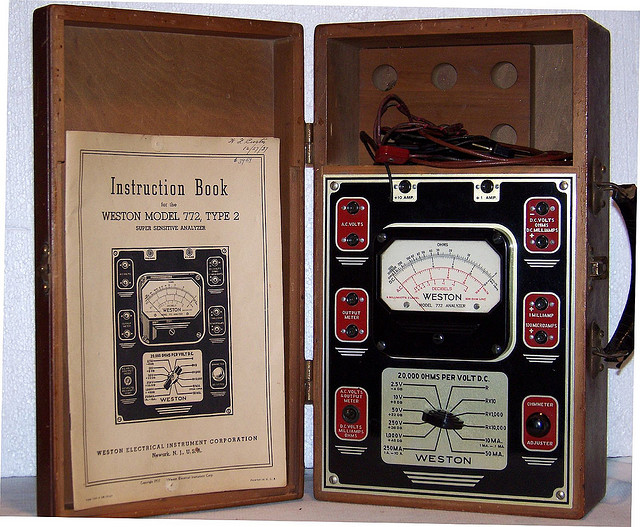
Weston Model 772 multimeter of 1930's. Note the great deco style.

Weston Model 772 multimeter of 1930’s. Note the great deco style.

What were the old meters like? They usually had just one or two functions each. The meter would be housed in a wooden or bakelite box and it might be quite decorative such as the Weston 772 pictured here.

The RCA Senior VoltOhmyst WV-97A is a VTVM with style.

The RCA Senior VoltOhmyst WV-97A is a VTVM with style.

Experimenters soon found that meters tended to load the circuit they were testing and thus did not return exact readings. This created a need for what is called a high impedance meter and so was born the Vacuum Tube Voltmeter (VTVM) which was a high impedance device and as such allowed more precise measurements. The RCA Senior VoltOhmyst WV-97A is one such meter. Notice the great case design and use of color.

The Solar capacitor checker. Two tuning eye tubes and lots of color. As good as it gets.

The Solar capacitor checker. Two tuning eye tubes and lots of color. As good as it gets.

All of the above meters used mechanical meter movements and discrete components and are thus referred to as analog devices. At this time there were available other types of meters that made measurements not commonly found in the multimeters. Capacitance is one such value that radio technicians and hobbyists wanted to test and the Solar is an example of a meter that did the job. This has to be one of the most colorful meters in my collection. The extra dab of red paint (or is it nail polish) was applied by a former owner. I would never do that to a nice piece of equipment.

Laboratories, universities, and manufacturers also required meters that measured capacitance. The difference was that they needed something that was especially precise. This requirement was fulfilled by a Cambridge, Massachusetts company known as General Radio. Everything they produced was highly accurate and the capacitance bridges pictured here are good examples of their product line. I purchased the model 1611-A many years ago. It came with a case cover, power cord, and full documentation.

The GR 1611-A, a highly accurate capacitance bridge. Heavy!

The GR 1611-A, a highly accurate capacitance bridge. Heavy!

It weighs at least 35 pounds and was a bit difficult to carry back to my car. At $25 I thought it was a steal. The second bridge pictured is one that I found today while attending the Eastern Connecticut Amateur Radio Association annual flea market in Dayville, CT. The vendor had tagged it with the very low price of $15, probably because it was missing the cover and because most hams are not interested in this ancient stuff.

This GR 740B works quite well. A good deal for $10.00. Hopefully it will look even better when I clean it up.

This GR 740B works quite well. A good deal for $10.00. Hopefully it will look even better when I clean it up.

I looked it over, mentioned that the cover was missing, and indicated that I did know what it was. Immediately the seller, who probably did not want to lug this thing back to his car at the end of the day, said “Will you take it for $10?” I was going to pay the $15 anyways so it was an easy decision. Once I got it home I tested the capacitance bridge. A 1.0 mfd capacitor tested out at 1.03 mfd. I could have put one more digit in there but that would be ‘reading between the lines’ a bit. In that case I would have said 1.035 or so (click on the photo to enlarge it and read the scale yourself). In any event, I was convinced that the unit was working. But then there is more! What would happen if I tested the capacitor on a modern multimeter that also did capacitance? Well, I just happened to have one of those.

The TekPower model TP4000ZC is one amazing little digital multimeter. From left to right: probes, meter, thermometer probe, RS232 computer interface cable. It also comes with a mini-CD containing software and drivers.

The TekPower model TP4000ZC is one amazing little digital multimeter. From left to right: probes, meter, thermometer probe, RS232 computer interface cable. It also comes with a mini-CD containing software and drivers.

The TekPower TP4000ZC is a fully modern digital multimeter that does just about everything. Besides the ordinary complement of multimeter features it also will measure temperature and capacitance. To take it one step further, TekPower provided a RS232 computer interface cable and software with this meter. That way you can take successive and continuous measurements that are streamed to a connected computer. The data can then go into a spreadsheet or database and be graphically displayed. The most amazing thing about this meter is the price. It is only $29.99 on Amazon.com. That’s where I got mine. It works great and there have not been any problems. I would prefer that it was made in the USA rather than China, but that unfortunately is the only way many businesses can compete these days. We invent it here and build it there. To get back to the point of this discussion, I tested the same capacitor on the TekPower. It measured 1.038 mfd (microfarads). I would say the old GR is in pretty good shape!

Note: If you found this post interesting, please pass the link on by using the provided social networking buttons found below. Thanks!


Posted in Modern Technology, Occasional Commentary, Radio: Amateur & Broadcast | Tagged , , , , , , , , | Leave a comment

The Seagate Backup Plus, a Way Cool Portable Hard Drive

3-1/4"x5"x1/2" This little USB 3.0 hard drive is a powerhouse with a full terabyte of space.

3-1/4″x5″x1/2″ This little USB 3.0 hard drive is a powerhouse with a full terabyte of space.

My desktop computer is seven years old. It’s a HP Pavilion a6000n PC and it works great. But then just like pets, all computers eventually meet their demise. I don’t know when mine will go up in smoke (may it be the hard drive or motherboard) but I don’t want to lose important data. What can I do?

There are online services that will backup your data to the cloud. They all require an annual fee that is usually at least $50/year for the low-end packages. I don’t like that option. I like to keep it local. Besides, I already pay enough monthly fees (garbage collection, oil burner service, Netflix, phone, water filtration system, etc.). So, let’s not go there.

I decided to investigate an external and portable hard drive that was reasonably priced. Fortunately it was amazingly easy to find just what I wanted! Since it was around Christmas time I was able to find all sorts of deals. The one that best suited me was the Seagate Backup Plus. Seagate is a trusted brand that has been around for a long time. This small USB 3.0 external hard drive that had 1 terabyte of storage was being offered by Amazon.com for only $59.99 (presently back up to $79.88). Since my entire desktop hard drive has only 250 MB of space, 1 terabyte sounded like enough. Unfortunately the only way to maximize the throughput speed of the device was to connect it to a USB 3.0 port. I only had USB 2.0 on my antiquated desktop. This was easily solved by purchasing a separate USB 3.0 PCI-E Express Card, the Anker Uspeed USB 3.0. It came with 4 USB ports and just required an open PCI-Express slot and a 5V 4-pin power source. My desktop had both. So for an additional $19.99 I gained 4 fast USB ports.

The description of the Seagate was not exactly clear about the capabilities of the included backup software. Fortunately the drive came with a Seagate Dashboard Software installer. I installed the software. The Dashboard starts off by enabling you to make a complete backup of your desktop hard drive. Thereafter the software does continuous backup. This means that any changes that you make on your computer hard drive will be immediately reflected on the Backup Plus. You don’t have to schedule anything. It is all taken care of. And yes, I did check to see if the program was actually keeping an accurate record of changes on my drive. Indeed it was. Everything is mirrored on the Seagate. The drive also comes with special options that allow you to backup some of your social media items. The one I was interested in was the Flickr backup. I provided the drive with my logon information and now it seamlessly keeps a backup of all 1,795 photos that I have stored there. If Flickr were to disappear tomorrow I would still have every photo I ever uploaded to it. The software will perform a similar function for Facebook and YouTube. I have not tried them yet (I have a YouTube account but not Facebook). You can also use the Dashboard to upload items to these services.

So, to sum up, I think this Seagate (STBU1000) is one heck of a deal. I have it sitting on top of my HP Pavilion where it remains very cool. There is a little LED to let you know it is running and that is it. It doesn’t even get hot. The best part of the deal was that Amazon was running a special when I made my purchase. They said that I could deduct $50 from my purchase if I took out an Amazon charge card. I did take out the card. The total purchase for the drive and the USB ports came to $29.98. They even included the USB cable for the drive! What a country.

Posted in Modern Technology, Occasional Commentary | Tagged , , , , , , , , , , , , | Leave a comment